What Is a SoundFont? How Apps Play Instruments Offline
Cihad Turhan5 min read
A SoundFont is a file, usually ending in .sf2, that holds recordings of real instruments plus instructions for playing them back at any pitch and loudness. A synthesizer reads the notes in a MIDI file and plays each one using those samples, so a few kilobytes of MIDI can sound like a piano, a string section or a drum kit without any audio being streamed.
That is why apps built on SoundFonts can make music fully offline. The instruments live on the device, and only the note instructions change from song to song. This guide explains how the pieces fit together, how SoundFonts compare with streaming audio and with VST plug-ins, and what that means for the apps you play.
MIDI is the sheet music, the SoundFont is the orchestra
A MIDI file contains no sound. It is a list of events: which note, when it starts, how hard it is played, when it stops, and which instrument should play it. Think of it as sheet music for a computer.
To hear anything, something has to perform those instructions. That performer is a synthesizer, and a SoundFont is one common way to give it instruments. Put the three together and you get:
| Part | What it holds | Analogy |
|---|---|---|
| MIDI file | Notes, timing, velocity, instrument choices | The sheet music |
| SoundFont (.sf2) | Recorded samples and playback rules | The orchestra's instruments |
| Synthesizer | Software that reads both and makes audio | The players |
Because the parts are separate, the same MIDI file can sound completely different with a different SoundFont, and the same SoundFont can play any MIDI file you give it.
A short history
According to Wikipedia's SoundFont article, the format was developed in the early 1990s by E-mu Systems and Creative Labs and first used on the Sound Blaster AWE32 sound card in 1994. SoundFont 2.0, the version behind the familiar .sf2 extension, followed in 1996 and added features such as true stereo samples. The same article notes that the format has since become widely used in software synthesizers.
Today, free software can play SoundFonts on ordinary computers and phones. FluidSynth, for example, describes itself as a real-time software synthesizer based on the SoundFont 2 specifications that can play MIDI files and render them to audio.
How a SoundFont plays a note
When the synthesizer receives a note, it does roughly this:
- Finds the instrument. The MIDI data says which program (instrument) to use, and the SoundFont maps that to a set of samples.
- Picks the closest sample. A good piano SoundFont has recordings across the keyboard, often at several loudness levels. The synth chooses the one closest to the requested note and velocity.
- Shifts the pitch if needed. If there is no recording of that exact note, it plays the nearest sample faster or slower to reach the right pitch.
- Shapes the sound. Playback rules in the file, such as how quickly the note fades in and out, are applied so it sounds like a real note rather than a raw recording.
- Mixes everything. All the notes from all the instruments are mixed into the final audio, in real time.
The quality depends on the SoundFont. A tiny file with a few samples per instrument sounds thinner than a large one recorded in detail.
SoundFont vs streaming audio
Streaming apps send you a finished recording. A SoundFont-based app sends nothing, because it builds the audio itself.
| Streaming audio | SoundFont synthesis | |
|---|---|---|
| What travels | A finished audio recording | Only note data (or nothing, if stored) |
| Needs internet | Usually, unless downloaded | No, once the app and SoundFont are on the device |
| Can change the parts | No, the mix is fixed | Yes, each instrument can be muted or changed |
| Sounds exactly like the original | Yes | No, it's a new performance of the notes |
That third row matters for games. Because every instrument is generated separately, an app can bring parts in and out of the mix on the fly.
SoundFont vs VST
A VST is a different idea. Virtual Studio Technology is Steinberg's plug-in standard: a piece of software that runs inside a DAW and can be a synthesizer, a sampler or an effect. Some VST instruments play samples, some generate sound from oscillators, and some load SoundFonts.
The practical difference: a SoundFont is data, a bank of samples any compatible player can read, while a VST is a program that only runs inside a host that supports it. For music production, VSTs are far more flexible. For an app that needs compact, portable instruments that work anywhere, a SoundFont is the simpler fit.
Why RingLoop works fully offline
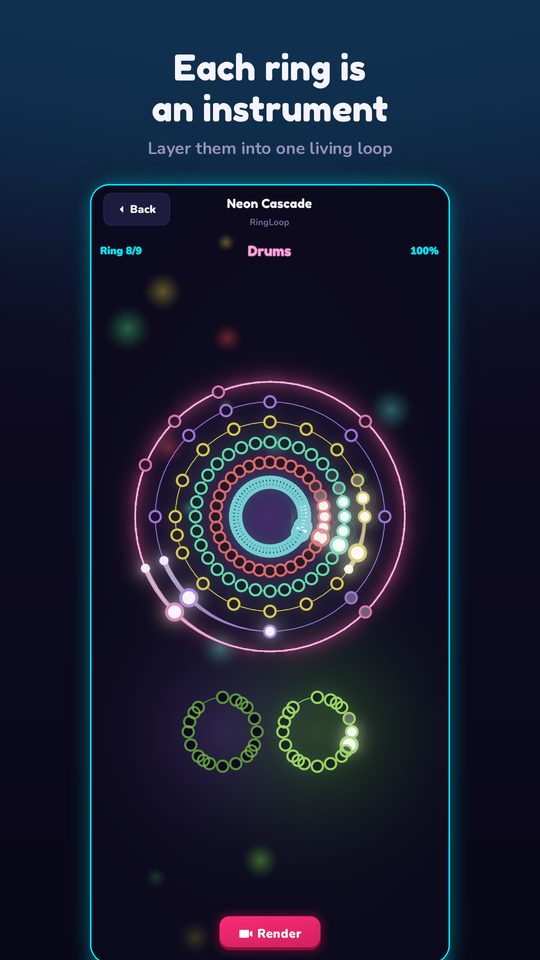
RingLoop synthesises every instrument on the device from a real SoundFont. That is what lets it work offline, and it is also what makes its core mechanic possible. Every song is a set of concentric rings, and each ring is one instrument. When you clear a ring in time, the game adds that instrument to the mix, like a loop station, until the whole song plays. A fixed recording couldn't be split apart like that; separately synthesised parts can.
It is also why importing your own MIDI file works. The level editor creates one ring per MIDI track and lets you adjust the mix per ring. The guide to turning a MIDI file into a looping music video shows the full flow from file to rendered clip.
If you like the idea of a music game that doesn't need a connection, Note Bounce also works offline. Its bouncing balls land on real sheet music, so you practice reading notes and rhythm with piano and classical songs, and it has MIDI import for custom levels. It's a good companion for a flight or a commute.
Try it
Open any MIDI file in a free player that uses SoundFonts, listen once, then swap to a different SoundFont and play it again. Hearing the same notes performed by two different instrument banks is the quickest way to understand what a SoundFont does. Then put your phone in airplane mode, open RingLoop, and play a level: every instrument you hear is being synthesised right there on the device.
Frequently asked questions
- Are SoundFonts free?
- Many are, and the format itself is openly used, but each SoundFont has its own license. Check the terms before using one in a commercial project or redistributing it.
- Can I play MIDI files without internet?
- Yes, as long as the app or player has a synthesizer and an instrument bank, such as a SoundFont, stored on your device. The MIDI file only holds note instructions, so nothing needs to be streamed.

Get RingLoop
Free to play on iPhone, iPad and Android. Import your MIDI, clear the rings and render the loop as a video.