5 Satisfying Loop Video Formats to Try This Week
Cihad Turhan6 min read
Five satisfying loop video formats you can make this week are the full build-up, the last-ring-only payoff, the genre swap, the 3-loop compilation and the muted-start "turn your sound on" reveal. Each one below has a recipe, a target length and a caption you can copy, and all five start from a single RingLoop render.
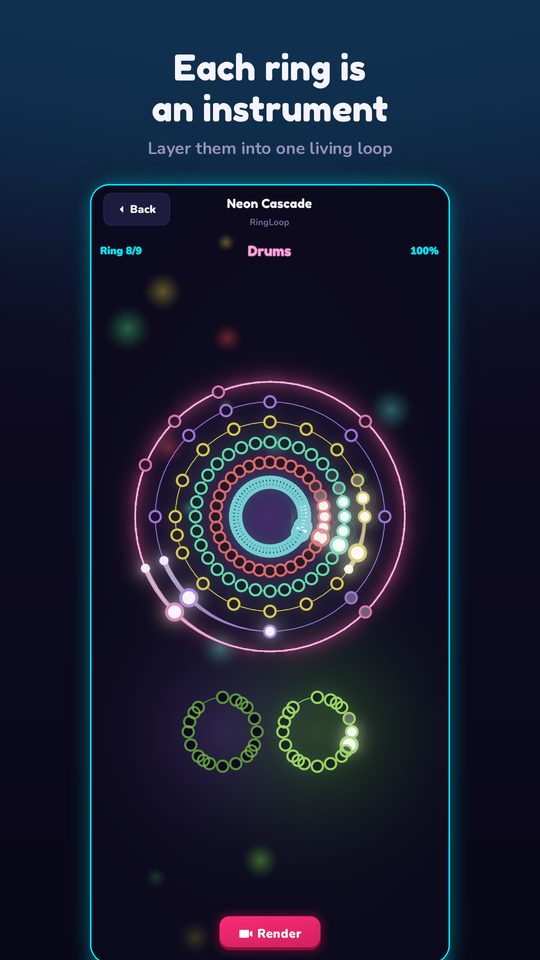
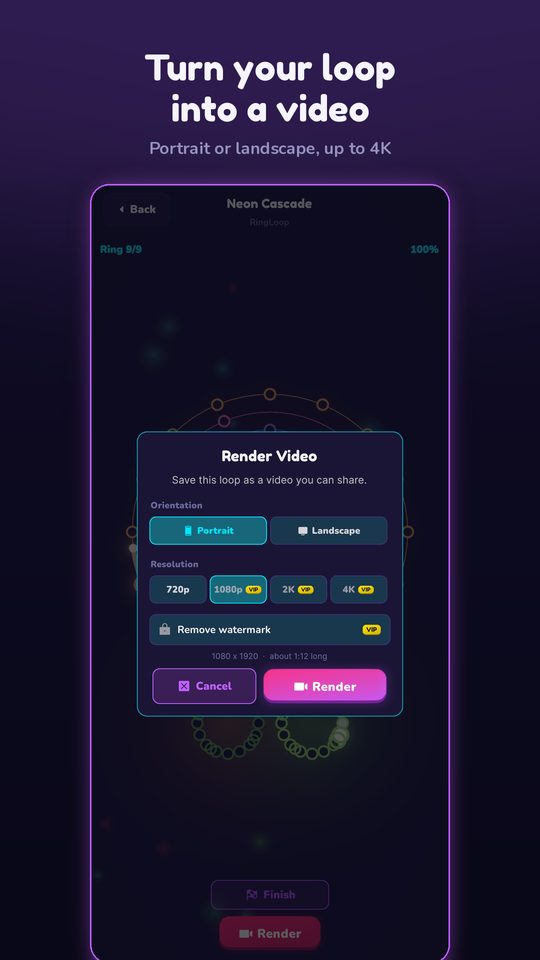
Oddly satisfying videos tend to show something completing cleanly. A music loop does that twice: the layers lock into a full song, and the clip repeats without a seam. RingLoop is built around that moment. Every song is a set of concentric rings, and each ring you clear adds its instrument to the mix until the whole song plays. When you render, you can choose portrait for Reels and Shorts or landscape for YouTube, from 720p up to 4K, with a "perfect loop" option for seamless repeats.
If you haven't rendered a clip yet, start with how to turn a MIDI file into a looping music video, then come back and pick a format. The target lengths below are starting points to test, not platform rules.
1. The full build-up
Target length: the whole song, ideally 30 to 60 seconds. Caption: "Every ring adds one instrument. Count them."
This is the classic: start on empty rings and end on the full mix. The satisfaction comes from accumulation, so the recipe is about pace.
- Pick a song or MIDI with four to six clearly different parts. Fewer, louder layers beat many quiet ones.
- In the level editor, adjust the mix per ring so each new instrument is obvious on phone speakers.
- Render in portrait with the perfect loop option on, so the full mix flows back into the opening without a jump.
- Don't trim the ending. Let the complete song play for at least one phrase after the last ring clears.
2. Last ring only
Target length: 7 to 12 seconds. Caption: "Skipped to the best part."
This format cuts straight to the payoff. Render the full run, then trim it in your phone's video editor so the clip starts a bar or two before the final ring and ends after the full mix has played once.
- Start the cut on a downbeat. Cutting mid-bar makes the opening sound like an accident.
- Because you trimmed the render, the perfect loop no longer lines up. End the clip on the last beat of a bar so the jump back to the start still lands on the beat.
- Leave the rings visible in the first frame. Viewers should see that one ring is left and the rest are already lit.
3. The genre swap
Target length: 15 to 20 seconds per version, posted as a pair or joined into one clip. Caption: "Same melody, two moods. House or lo-fi?"
Take one public-domain melody and arrange it twice in your own music software, then import both MIDI files. Beethoven's "Ode to Joy" works well because its opening phrase is widely recognized. Marble Music hosts an Ode to Joy MIDI you can use as the melody track; arrangements can carry their own rights, so check the license before you publish.
| Track | House version | Lo-fi version |
|---|---|---|
| Tempo | About 124 BPM | About 80 BPM |
| Drums | Kick on every beat, open hat on the offbeat | Lazy kick and snare, swung hats |
| Bass | Short offbeat notes | Long, round notes on the chord roots |
| Chords | Stabs on the offbeats | Soft held chords |
| Melody | Same notes in both | Same notes in both |
Keep one MIDI track per part so each becomes its own ring. RingLoop synthesizes every instrument on the device from a SoundFont, so the genre difference comes from the tempo, rhythm and note choices you write, not from your DAW's sounds.
4. The 3-loop compilation
Target length: 20 to 30 seconds. Caption: "Three loops, three moods. Which one goes on repeat?"
Render three short loops and join them in your editor. This works well when you have several half-finished ideas and none is strong enough to post alone.
- Use the same orientation and resolution for all three, so the joins don't change the frame.
- Order them by energy: calm, medium, then the busiest loop last.
- Cut each one right after its full mix plays once. The compilation should feel like three payoffs, not three build-ups.
- Mix sources if you like: a catalogue song, your own MIDI import and one of your genre-swap versions.
5. The muted-start reveal
Target length: 10 to 15 seconds. Caption: "Sound on for the last ring."
Not everyone scrolls with the sound on. This format turns that into a hook: the first two or three seconds are silent visuals with on-screen text reading "Turn your sound on", and the audio arrives as the rings fill.
- Trim the render so the opening shows the rings already in motion.
- In your editor, mute the first two or three seconds of audio, then fade it in quickly on a downbeat.
- Put the text in the center of the frame, away from the edges where platform buttons and captions sit.
- Time the full audio to land just before the last ring clears, so sound-on viewers get the complete mix as their reward.
RingLoop is free to play and shows ads to non-VIP players. VIP unlocks larger renders and watermark-free videos, which matters most for the formats you plan to post repeatedly.
Bonus format 6: the same melody as a marble clip
A good way to learn which kind of satisfying your audience prefers is an A/B test with the same melody. Import your genre-swap melody track into Marble Music (formerly Beat Bounce), where a marble bounces on every note, and post it a few days after the RingLoop version. One clip rewards precise sync, the other rewards layers locking together, and comparing how far people watch each tells you which to make more of.
Your week, one format a day
| Day | Format | Prep |
|---|---|---|
| Monday | Full build-up | Pick a four-to-six-part song and tune the mix |
| Tuesday | Last ring only | Trim Monday's render |
| Wednesday | Genre swap | Arrange the melody twice and import both |
| Thursday | 3-loop compilation | Reuse Monday's and Wednesday's renders plus one new loop |
| Friday | Muted-start reveal | Re-edit your strongest clip with a silent opening |
Most of the week reuses Monday's work, so one good render becomes several posts. Open RingLoop, clear your first song ring by ring, and start with the build-up.
Frequently asked questions
- What makes a video oddly satisfying?
- Oddly satisfying videos usually show something fitting, finishing or repeating cleanly, such as a pattern completing or a motion that lands exactly in place. A music loop that locks into its full mix and repeats without a visible jump fits that description.
- How long should a looping video be?
- There is no single correct length. Match it to the payoff: a single moment like the last ring clearing needs only a few seconds, while a full build-up needs enough time for every layer to enter and the full mix to play for one phrase.

Get RingLoop
Free to play on iPhone, iPad and Android. Import your MIDI, clear the rings and render the loop as a video.