Rhythm Games With Level Editors: Make Your Own Charts
Cihad Turhan5 min read
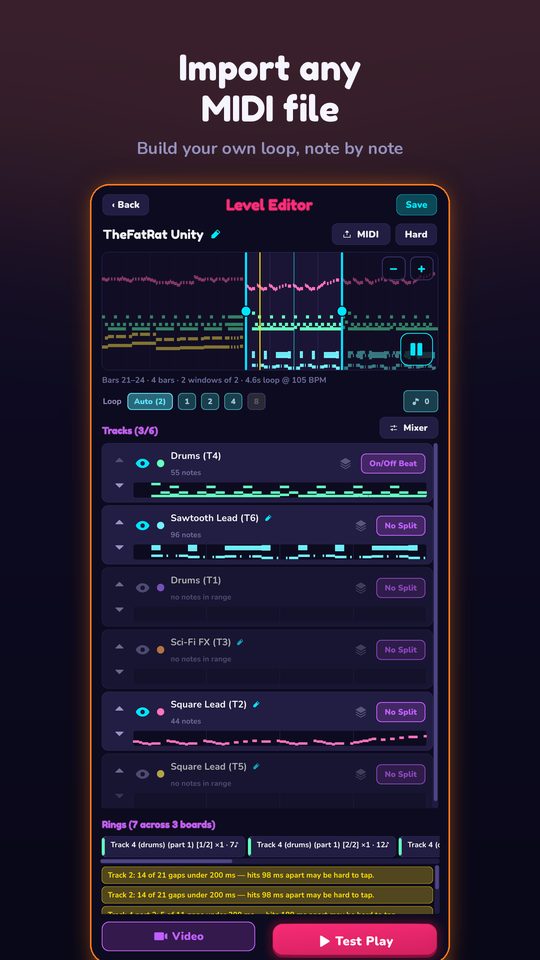
If you want to make your own rhythm game levels, the main choice is between editors where you place every note by hand against an audio track, such as osu!, Beat Saber and A Dance of Fire and Ice, and editors that build the notes from a MIDI file, such as RingLoop's. Hand-charting gives you total control and takes practice; MIDI-based editing gets you a playable level in minutes and lets you tune it afterward.
Below is a fair look at four editors, what each is built for and where it runs. Details for the games from other studios come from their official pages and coverage at the time of writing, so check each game's store page for the latest. RingLoop is made by the developer of this blog.
At a glance
| Game | How levels are made | Where the editor runs | Best for |
|---|---|---|---|
| osu! | Hand-placed hit objects timed to audio | Computer | Detailed, community-ranked charts |
| Beat Saber | Hand-placed blocks and obstacles in VR space | PC | VR mappers |
| A Dance of Fire and Ice | Hand-built tile paths with events | Steam version | One-button precision levels |
| RingLoop | Generated from a MIDI file, one ring per track, then tuned | iOS and Android | Turning a MIDI file into a playable, renderable level |
osu!: the deep, community-driven editor
osu! is a free rhythm game with a large community of mappers. Its wiki documents an in-game beatmap editor organized into Compose (placing hit objects), Design (storyboards and visual effects), Timing (timing sections and hitsounds) and Song setup (metadata).
How it works: you load an audio file, set the song's timing precisely, then place every circle, slider and spinner yourself.
Choose it if you want granular control and a community that reviews and ranks maps. Expect a learning curve: getting timing right is a skill in itself.
Beat Saber: mapping in three dimensions
Beat Saber is a VR rhythm game where you slice blocks to the beat. Beat Games released an official level editor for PC, and later added a 3D version of it, as Mixed News reported.
How it works: you place blocks by direction and color along the song's timeline, plus obstacles you have to dodge.
Choose it if you own a VR headset and want to choreograph movement, not just taps.
A Dance of Fire and Ice: one button, many paths
A Dance of Fire and Ice is a strict one-button rhythm game where two planets orbit along a path of tiles. Its Steam version includes a level editor, and custom levels can be shared through Steam Workshop.
How it works: you build the tile path to the rhythm of a song, adding speed changes, twirls and visual events.
Choose it if you like precision and minimal controls, and you work on a computer.
RingLoop: from MIDI file to level
RingLoop is a free-to-play rhythm game on iOS and Android where every song is a set of concentric rings. Clear a ring in time and its instrument joins the mix, like a loop station, until the full song plays.
Its level editor takes a different route from the hand-charting games:
- Import a MIDI file. RingLoop creates one ring per MIDI track, using the notes already in the file.
- Adjust the mix per ring. Balance each instrument so the song sounds right.
- Split dense parts. If a track has too many notes to play, split it across rings.
- Test-play and tune the difficulty. Play your level and adjust until it feels fair.
- Render a video. Portrait or landscape, from 720p up to 4K, with a perfect loop option, saved to your camera roll.
Choose it if you have MIDI files, you want to make levels on your phone, or you want to turn your level into a shareable clip. The guide to turning a MIDI file into a looping music video walks through the full flow.
Keep in mind it charts the notes in your file, so the quality of the MIDI shapes the level. A file with separate tracks per instrument works best.
Hand-charting vs MIDI-based editing
| Hand-charting (audio) | MIDI-based | |
|---|---|---|
| Starting point | An audio file | A MIDI file |
| Time to a playable level | Longer: every note is placed by hand | Short: the notes are already in the file |
| Control | Every note is your choice | Notes come from the file, then you tune |
| Skill needed | Timing and mapping practice | Basic MIDI preparation |
| Sound | The original recording | The game's own instruments |
Build your first level today
Whatever editor you use, copyright applies to the music. Public-domain classical and folk pieces or your own compositions are the safest material, especially if you plan to share your level or a video of it. For MIDI files, the Mutopia Project publishes public-domain scores and MIDI.
Another good source is Marble Music (formerly Beat Bounce). Its site hosts more than 1,100 free MIDI files, and the app has its own level editor with MIDI import that turns a song into a bouncing-marble video. If you enjoy building levels, it's a second, more relaxed place to put the same MIDI files to work.
Pick one short public-domain piece and decide how you want to work: by hand against audio, or from a MIDI file. If you go the MIDI route, find a multi-track file, import it into RingLoop, play it, tune one ring that feels too hard, and render the result. You'll have a finished custom level, and a video of it, before the end of the day.
Frequently asked questions
- What is the easiest rhythm game level editor for beginners?
- It depends on what you start with. If you have a MIDI file, a MIDI-based editor like RingLoop's builds the notes for you. If you have an audio track, editors like osu!'s or Beat Saber's give full control but expect you to place and time every note yourself.
- Can I make rhythm game levels on my phone?
- Yes. RingLoop's level editor runs on iOS and Android and imports MIDI files directly. Several well-known PC editors, such as Beat Saber's, run on a computer instead.

Get RingLoop
Free to play on iPhone, iPad and Android. Import your MIDI, clear the rings and render the loop as a video.