Portrait vs Landscape Video for Reels, Shorts and YouTube
Cihad Turhan6 min read
Render portrait (vertical 9:16) for Instagram Reels, YouTube Shorts and TikTok, and landscape (horizontal 16:9) for regular YouTube videos and longer compilations. If a clip is going to both kinds of places, render the same loop twice, once in each format, instead of cropping one version to fit the other.
That is the whole decision in two sentences. The rest of this guide covers what the platforms actually say about aspect ratios, when landscape is worth the extra render, which resolution to pick for drafts and finished uploads, and how to keep captions out of the parts of the screen that get covered.
Which format goes where
| Where it's going | Render | Why |
|---|---|---|
| Instagram Reels | Portrait | Fills the screen in the vertical Reels feed |
| YouTube Shorts | Portrait | Shorts are square or vertical by definition |
| TikTok | Portrait | The main feed is watched on phones held upright |
| Regular YouTube video | Landscape | Matches the standard widescreen player |
| Long compilation (several songs) | Landscape | Better for watching on a TV or computer |
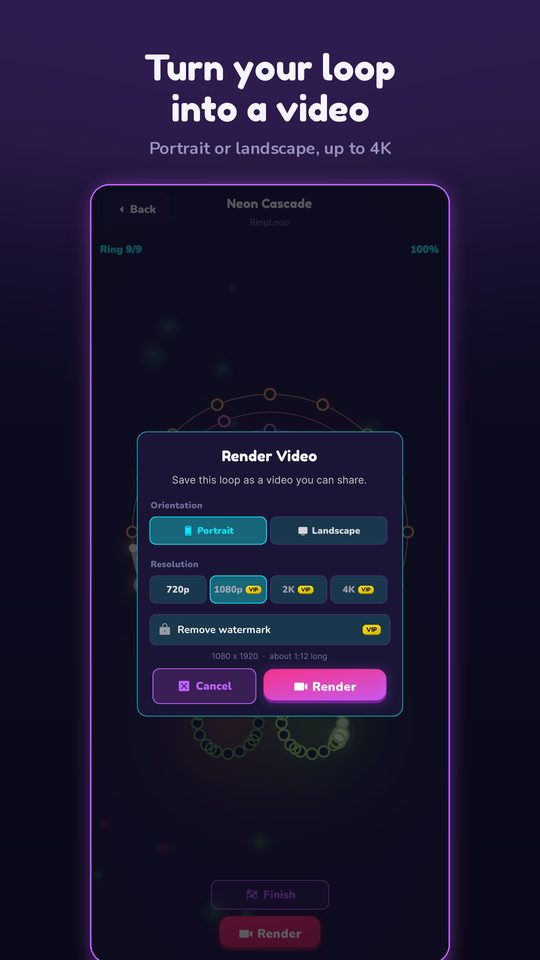
RingLoop's render dialog offers exactly these two shapes: portrait for Reels and Shorts, landscape for YouTube.
What the platforms say about aspect ratio
Each platform publishes its own rules, and they are worth reading straight from the source rather than from a blog summary:
- YouTube Shorts. YouTube's help page on three-minute Shorts says that videos with a square or vertical aspect ratio up to three minutes long are categorized as Shorts. A landscape upload of the same length is a regular video.
- Regular YouTube videos. YouTube's resolution and aspect ratio guide says the standard aspect ratio on a computer is 16:9, and that the player adjusts its size to match other aspect ratios.
- Instagram Reels. Instagram's Reel size help page lists the aspect ratios, frame rate and minimum resolution reels support. A vertical 9:16 render is the shape that fills the Reels feed.
- TikTok. The feed is built around full-screen vertical video watched on a phone. Check TikTok's own Help Center for current upload limits, since they change.
The practical takeaway: a vertical 9:16 render works on all three short-form platforms, and a horizontal 16:9 render is the native shape for YouTube's main player.
When landscape is worth the extra render
Portrait covers most short clips, but landscape earns its place in a few situations:
- You're building a YouTube channel, not just a Shorts feed. A longer upload, such as a full playthrough of a song from first ring to final mix, belongs in the standard player, where viewers can watch on a TV.
- You're making a compilation. Five or ten songs in one video is a sit-back-and-watch format. Landscape suits that better than a tall frame.
- You want a thumbnail-friendly frame. Concentric rings sit naturally in the center of a wide frame, leaving room on both sides for a title.
- You're embedding the video on a website. Most page layouts give a video a wide slot, and a vertical clip there ends up small with empty space beside it.
If none of these apply, skip landscape and spend the time on a second portrait clip.
Render both from the same loop
When a song deserves both formats, work through it once and render twice:
- Import and tune the level once. Bring the MIDI file into the level editor, adjust the mix per ring, and test-play until you can clear it cleanly. For the full import walkthrough, see how to turn a MIDI file into a looping music video.
- Render portrait with perfect loop on. Short-form feeds replay clips, so the "perfect loop" option makes the end flow straight back into the start.
- Render landscape for YouTube. For a long video, perfect loop matters less, but it still helps if you plan to repeat the loop to make a longer track.
- Name the files clearly. Both renders save to your camera roll, so rename or tag them, for example "canon-portrait" and "canon-landscape", before you upload.
A worked example: import a public-domain MIDI of Pachelbel's Canon in D (check the file's license, or use a source like the Mutopia Project), post the portrait version as a Short and a Reel with the on-screen line "Pachelbel, one ring at a time", and later add the landscape version to a "classical loops" compilation on YouTube.
Pick a resolution: drafts vs masters
RingLoop renders from 720p up to 4K. Higher isn't always better while you're still experimenting:
| Stage | Resolution | Use it for |
|---|---|---|
| Draft | 720p | Checking timing, the loop point and caption placement |
| Everyday post | A middle setting | Regular Reels, Shorts and TikTok uploads |
| Master | Up to 4K | YouTube uploads and clips you want to keep or reuse |
Smaller files render and transfer faster, which matters when you're testing three caption ideas. Save the large renders for the version you'll actually post. VIP unlocks larger renders and watermark-free videos, so free renders are best used for drafts and quick tests.
Whatever you pick, stay at or above the minimum a platform asks for, such as the minimum resolution on Instagram's Reel page above.
Keep captions out of the covered zones
On vertical feeds, the app interface sits on top of your video: the caption text and username along the bottom, and buttons such as like, comment and share down the right side. Anything you place there may be hidden. Before posting a portrait clip:
- Keep on-screen text in the upper-middle part of the frame.
- Leave the bottom area and the right edge free of words.
- Keep the rings centered so the interface never covers the action.
- Preview the clip in each app's upload screen before you publish, since layouts differ by platform and change over time.
- Use large, short text: "Wait for the last ring" reads at a glance, a full sentence doesn't.
In landscape, the YouTube player's controls and progress bar appear along the bottom, so the same rule holds: keep text away from the lower edge.
If you also make bouncing-ball videos, Marble Music (formerly Beat Bounce) turns songs and MIDI files into marble music videos and renders in up to 4K for TikTok, Instagram Reels and YouTube Shorts. The same portrait-first plan and caption checklist apply, so you can run a matching series across both styles from one MIDI file.
Render your first pair
Pick one song, clear every ring, and render a portrait clip with perfect loop on. If it's a song you'd happily watch for three minutes, render the landscape version too and start a YouTube playlist. Get the app from the RingLoop home page and try both shapes on your next loop.
Frequently asked questions
- What aspect ratio is a YouTube Short?
- YouTube treats uploads with a square or vertical aspect ratio of up to three minutes as Shorts. A full-screen vertical 9:16 video is the most common choice because it fills a phone screen held upright.
- Should I post landscape videos on TikTok?
- You can, but a landscape clip fills only a strip across the middle of a phone held upright, so the rings and the action look small. For TikTok, render a portrait version and keep the landscape one for YouTube.
Get RingLoop
Free to play on iPhone, iPad and Android. Import your MIDI, clear the rings and render the loop as a video.