Jingle Bells as a Rhythm Loop: A Holiday Clip in Rings
Cihad Turhan5 min read
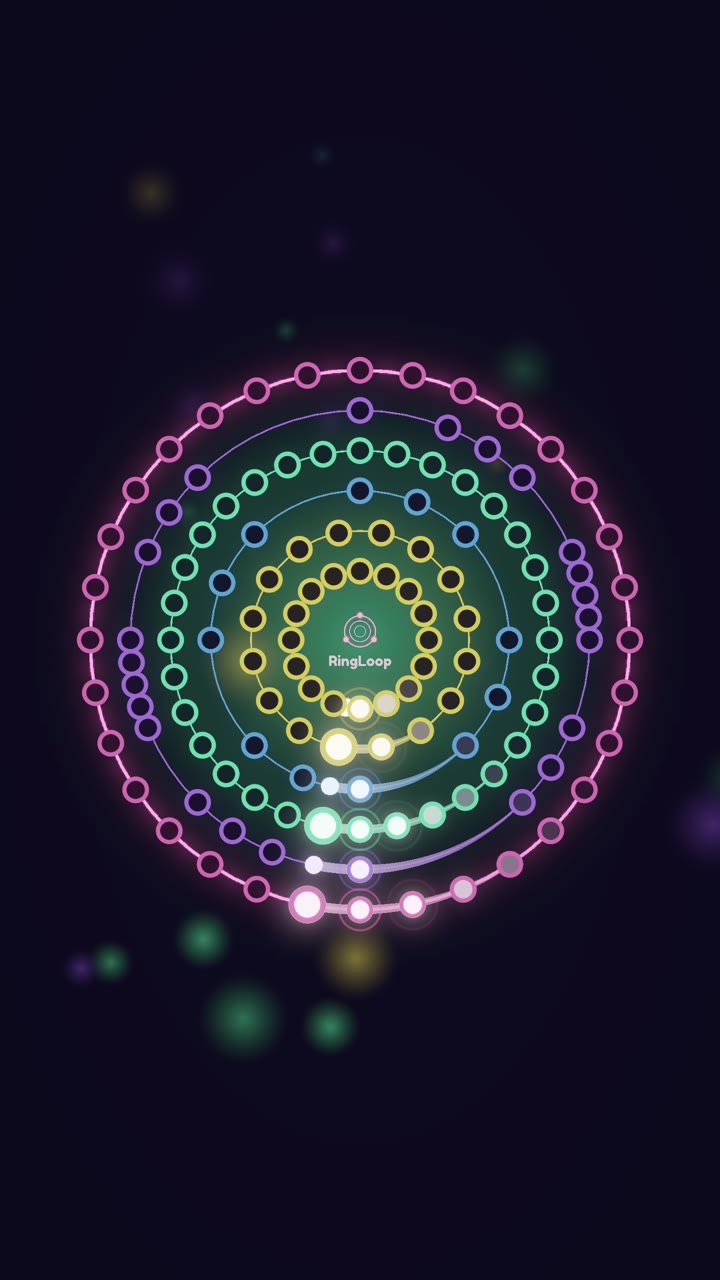
Jingle Bells makes one of the easiest holiday loop videos you can build: the song is in the public domain, and its chorus is mostly repeated notes in a steady rhythm, so it is simple to play and instantly recognizable. Import a multi-track MIDI into RingLoop, give the chorus melody, bass, chords and a percussion part their own rings, and render a short portrait loop of just the chorus.
That combination of easy and familiar is what makes it work. Viewers know the tune in under a second, and a clean run looks good on camera without hours of practice.
A sleigh-ride song from 1857
According to Wikipedia's Jingle Bells article, James Lord Pierpont wrote the song, and it was published in 1857 under the title "The One Horse Open Sleigh". Its lyrics are about racing sleighs in the snow and never mention Christmas; the association with the holiday came later. Both Medford, Massachusetts, and Savannah, Georgia, have claimed it as their own, which is a good caption hook on its own.
Because it was published in 1857, the composition is public domain. That is not true of every recording or arrangement, so build your own version from a MIDI file you can use.
Why the chorus is a perfect rhythm loop
The chorus is built on repetition. Its opening phrase is the same note struck three times, then three times again, before the melody finally moves. For a rhythm game, that means:
- Clear timing. Repeated notes on the beat are easy to read and hit, which suits a relaxed, family-friendly run.
- A strong pulse. The steady rhythm gives every other layer something solid to lock to.
- A natural loop point. The chorus ends where it can start again, so a looped clip doesn't feel cut off.
If you want a challenge clip instead, the verses move faster and wander more, so you can include them for difficulty.
Plan your rings
RingLoop creates one ring per MIDI track, so the order of your tracks becomes the order of your build-up. A layout that works for this song:
| Ring | Part | What it adds |
|---|---|---|
| 1 | Percussion (a bell or shaker pattern) | The sleigh-bell pulse, recognizable even before the tune |
| 2 | Bass | Bounce and weight on beats one and three |
| 3 | Chords | The bright major harmony |
| 4 | Chorus melody | The hook arrives last as the payoff |
Starting with percussion is a deliberate choice. A steady jingle on its own creates a small mystery, and the moment the melody lands on the last ring answers it.
Build it step by step
1. Find or make the MIDI
Look for a multi-track instrumental arrangement, or make your own: the chorus is short enough to enter by hand in any notation app or DAW in a few minutes. Public-domain sources such as the Mutopia Project are good places to look, and the Marble Music MIDI library hosts more than 1,100 free MIDI files. Check the license of whichever file you use.
2. Trim to the chorus
For the loop clip, cut the file down to the chorus, usually 16 bars. Keep a second, full-length version for a longer landscape video later.
3. Import and balance
Import in the level editor and confirm each part landed on its own ring. Then adjust the mix per ring: keep the percussion present but not harsh, and bring the melody slightly forward so the hook is clear on a phone speaker. If a part is too dense, split it across two rings. The guide to turning a MIDI file into a looping music video covers importing in more detail.
4. Test-play and tune
Test-play the level and tune the difficulty. For a holiday clip aimed at families, a relaxed setting usually makes the better video. RingLoop has no timers, lives or energy, so anyone can retry at their own pace.
Render and post
Render in portrait with the perfect loop option on, so the end of the chorus flows straight back into its start. RingLoop renders from 720p up to 4K and saves to your camera roll, and VIP unlocks larger renders and watermark-free videos.
Caption ideas that use the song's history:
- "Jingle Bells was a sleigh-race song from 1857 before it was a Christmas song. Here it is, one ring at a time."
- "Bells first, melody last. Wait for ring four."
- "Two towns claim this song. Neither claim changes how good the chorus sounds as a loop."
Post it in early December and pin a comment asking which holiday tune to build next.
Jingle Bells is also one of the easiest melodies to read, since the chorus starts on one repeated note. Note Bounce lands bouncing balls on real sheet music, and its MIDI import lets you build a level from the same file you used here. Playing the chorus on the staff after hearing it in rings is a gentle first step into reading music.
Build it this week
Make or find a short chorus MIDI, put the bells on ring one and the melody on ring four, and render a perfect-loop portrait clip. Then save the level so you can come back in December and render a landscape version for YouTube without starting over.
Frequently asked questions
- Is Jingle Bells a Christmas song?
- Not originally. James Lord Pierpont published it in 1857 as "The One Horse Open Sleigh", and its words describe a winter sleigh ride without mentioning Christmas. It became attached to the holiday later.
- Can I use Jingle Bells in my videos?
- The 1857 song is in the public domain, so you can build your own version of it. Specific modern recordings and arrangements are still protected, so use your own MIDI or one whose license you have checked, never a commercial recording.
Get RingLoop
Free to play on iPhone, iPad and Android. Import your MIDI, clear the rings and render the loop as a video.