Best Offline Music Games for Flights and Commutes
Cihad Turhan5 min read
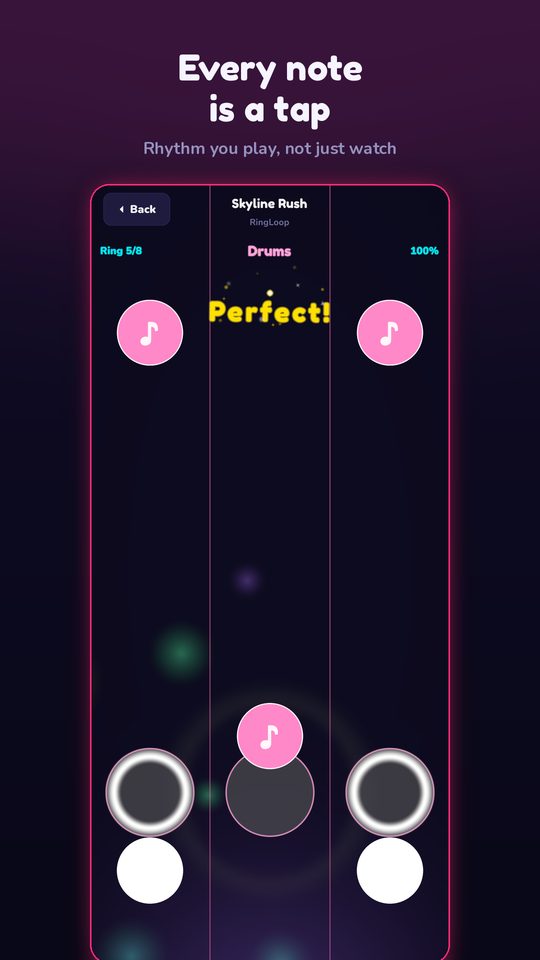
The best offline music games for flights and commutes include RingLoop and Note Bounce for relaxed, music-first play, Deemo for a piano game with a story, A Dance of Fire and Ice for a hard one-button challenge, and Magic Tiles 3 for quick piano-tile sessions. Each one states offline play on its official site or store listing, and each suits a different mood and skill level.
A quick disclosure: RingLoop and Note Bounce are made by the same developer as this blog. They're included because they genuinely work offline, and the other three picks come from other studios with their own strengths. For every game below, offline support was checked on its official store page or website, and games where it couldn't be confirmed were left out.
Quick picks at a glance
| Game | Platforms | Style | Difficulty |
|---|---|---|---|
| RingLoop | iOS, Android | Clear rings to build a song layer by layer | Relaxed, with no timers, lives or energy |
| Note Bounce | iOS, Android, Steam | Balls bounce on real sheet music | Relaxed, good for learning to read notes |
| Deemo | iOS, Android | Piano rhythm game with a story | Varies by song |
| A Dance of Fire and Ice | iOS, Android, Steam, Mac | One button, two orbiting planets | Hard; built for precision |
| Magic Tiles 3 | Android (listing checked) | Tap piano tiles in time | Easy to start, faster songs get tough |
RingLoop: build a song ring by ring
In RingLoop, every song is a set of concentric rings. Clear a ring in time and its instrument joins the mix, like a loop station, until the whole song plays. It works offline, and every instrument is synthesized on the device from a real SoundFont, so the music doesn't depend on streaming.
Why it suits travel: there are no timers, lives or energy, so a short commute is enough for a song or two, and you can stop whenever your stop comes up. The catalogue mixes classical melodies remixed into neon with originals across house, lo-fi, synthwave and chiptune. If you have a long flight, the level editor imports MIDI files with one ring per track, so you can prepare a few of your own songs at home and test-play them in the air. When you land, you can render a run as a video; see how to turn a MIDI file into a looping music video.
Honest note: it's free to play and shows ads to non-VIP players.
Note Bounce: practice reading music on the go
If you'd rather come back from a trip with a new skill, Note Bounce is the second offline pick from the same developer. Bouncing balls land on real sheet music, so you learn to read notes and rhythm while playing piano and classical songs, and it works offline on iOS, Android and Steam. It's free with in-app purchases, and its MIDI import lets you build levels from your own files before you leave.
Three more offline picks from other studios
Deemo
Deemo by Rayark is a piano rhythm game wrapped in a story, and its App Store listing describes it as a stand-alone game that doesn't need an internet connection to play. Style: gentle piano music with a story you uncover as you play. Difficulty: varies from song to song. It's a good pick if you want something that feels like a short story rather than a score chase.
A Dance of Fire and Ice
A Dance of Fire and Ice by 7th Beat Games is a one-button rhythm game where you guide two orbiting planets along a path in time with the music. Its Google Play listing marks it as playable offline, and it's also on iOS, the Mac App Store and Steam. Style: minimal visuals, unusual rhythms. Difficulty: hard. It rewards precise timing, so it's best when you can focus, such as a long flight rather than a crowded train.
Magic Tiles 3
Magic Tiles 3 is a piano-tiles game: tap the tiles as they scroll down in time with the song. Its Google Play listing mentions an offline mode for playing anywhere. Style: fast, familiar, one-handed. Difficulty: easy to pick up, with faster songs that get demanding. It's the quickest of the five to play in short bursts, so check in airplane mode which songs you can play before you go.
Download before you fly: checklist
Offline play only works if the game is ready before you lose signal. Run through this the night before:
- Install and open each game once on Wi-Fi. First launches often download extra data or finish setup.
- Play one song in airplane mode at home. That's the only reliable test that a game really works offline.
- Download any extra songs or content you plan to play, if the game separates them from the install.
- Finish purchases at home. Store purchases need a connection.
- Prepare your own levels. In RingLoop or Note Bounce, import any MIDI files you want before leaving.
- Bring wired headphones or charge wireless ones. Rhythm games depend on hearing the beat clearly.
- Check audio latency. Wireless headphones can add delay. If your hits feel late, look for a calibration or offset setting in the game, or switch to the phone speaker.
- Charge your phone and pack a power bank. Animated games drain the battery faster than you might expect.
Pick one for your next trip
Choose by mood: RingLoop for relaxed, layered music, Note Bounce for learning to read notes, Deemo for a story, A Dance of Fire and Ice for a real challenge, and Magic Tiles 3 for quick taps. Install two that feel different, test them in airplane mode tonight, and you'll have something for both a short commute and a long flight.
Frequently asked questions
- Do rhythm games work without internet?
- Many do, but not all, and some features such as purchases, leaderboards or sharing still need a connection. Check the store listing for offline play and open the game once on Wi-Fi before you travel.
- Is RingLoop free?
- Yes, RingLoop is free to play on iPhone, iPad and Android. It shows ads to non-VIP players, and VIP unlocks larger renders and watermark-free videos.

Get RingLoop
Free to play on iPhone, iPad and Android. Import your MIDI, clear the rings and render the loop as a video.