Best Loop and Beat Apps for Beginners (2026)
Cihad Turhan6 min read
The best loop app for a beginner depends on what you want to do: BandLab and GarageBand are the easiest free ways to build your own beats, Incredibox is the friendliest way to play with layers, Loopy Pro is the pick for live looping, and Groovepad is the quickest pad-based option. If you want to play songs as layered loops and render them as videos, RingLoop does that, but it's a rhythm game with a MIDI editor, not a music studio.
All the app details below were checked on each app's official site or store listing in October 2026. Prices and features change, so check the listing before you buy anything.
Quick picks by goal
| Your goal | App | Platforms | Cost |
|---|---|---|---|
| Make full beats and songs | BandLab | Web browser, iOS, Android | Free, optional paid membership |
| Build beats from loops on an iPhone or iPad | GarageBand (Live Loops) | iPhone, iPad | Free |
| Play with layers like a game | Incredibox | Web demo, iOS, Android, Mac, Windows | Free demo, paid app |
| Loop live with an instrument or voice | Loopy Pro | iPhone, iPad | One-time purchase, 7-day free trial |
| Tap pads to trigger ready-made sounds | Groovepad | iOS, Android | Free with in-app purchases |
| Play songs as layered loops and render video | RingLoop | iOS, Android | Free to play, ads for non-VIP players |
Make your first beat: BandLab or GarageBand
BandLab is a music-making platform, free to use with an optional paid membership, you can use in a web browser on a computer or install on iOS and Android. Its mobile Looper lets you trigger pre-made loop packs that stay in sync, which is an easy way to hear how drums, bass and melody fit together. When you outgrow that, BandLab also has a free full studio (a DAW) for arranging whole tracks.
GarageBand is Apple's free app for iPhone and iPad. Its Live Loops mode puts musical phrases in cells on a grid. You start and stop cells freely while everything stays in sync, so you can perform a beat like a DJ. Templates come with instruments and prerecorded cells, or you can start from an empty grid.
A first session in either app:
- Start with a drum loop and let it repeat.
- Add a bass loop that starts on the same downbeat.
- Add one chord or melody loop.
- Drop the drums out for a few bars, then bring them back. That one move already sounds like an arrangement.
Play with layers: Incredibox
Incredibox turns layering into a game. You drag sound icons onto a crew of beatboxers, and each one adds a loop to the mix. There's a free demo with one version on the website and as a demo app on iOS and Android. The full app is a paid purchase on the App Store, Google Play, the Mac App Store, the Microsoft Store and Steam.
It's ideal if you want to hear how layers combine without learning any music software. You choose sounds rather than writing them, so it's best as a playground and ear-trainer, not a place to produce your own tracks.
Loop live: Loopy Pro
Loopy Pro is a live looper and music studio for iPhone and iPad. You record a phrase, it repeats, and you record the next layer on top, the same way a loop pedal works. It also handles MIDI sequencing and plugin hosting. Pricing is a one-time purchase with a 7-day free trial, and the developer says a Mac version is in development.
Choose it if you play an instrument or sing and want to build songs from your own recordings. Expect a learning curve, so start with one loop and one overdub.
Tap pads: Groovepad
Groovepad, from Easybrain, is a pad-based beat maker for iOS and Android. You pick a sound pack in a genre such as hip-hop, EDM, house or trap, then tap pads to start and stop sounds that loop in time, with effects like filter, flanger, reverb and delay. It's free with in-app purchases, including a Pro subscription.
It's the fastest route from opening an app to hearing something that sounds like a track. Because the sounds come from packs, it's best for experimenting and performing rather than writing original parts.
Play songs as loops and make a video: RingLoop
To be upfront, RingLoop is our app, and it's a different kind of tool from everything above. It's a free-to-play rhythm game for iOS and Android. Every song is a set of concentric rings. Clear a ring by tapping its notes in time, and that ring's instrument joins the mix, like a loop station, until the whole song plays. You aren't composing; you're performing the layers of a song that already exists.
Where it connects to beat making is the level editor. Import a MIDI file and you get one ring per MIDI track. You can adjust the mix per ring, split dense parts across rings, and test-play to tune the difficulty. So if your music app can export MIDI, a beat you made there can become a playable level. Then render the run as a video in portrait or landscape, from 720p up to 4K, with a perfect-loop option for seamless repeats. Videos save to your camera roll.
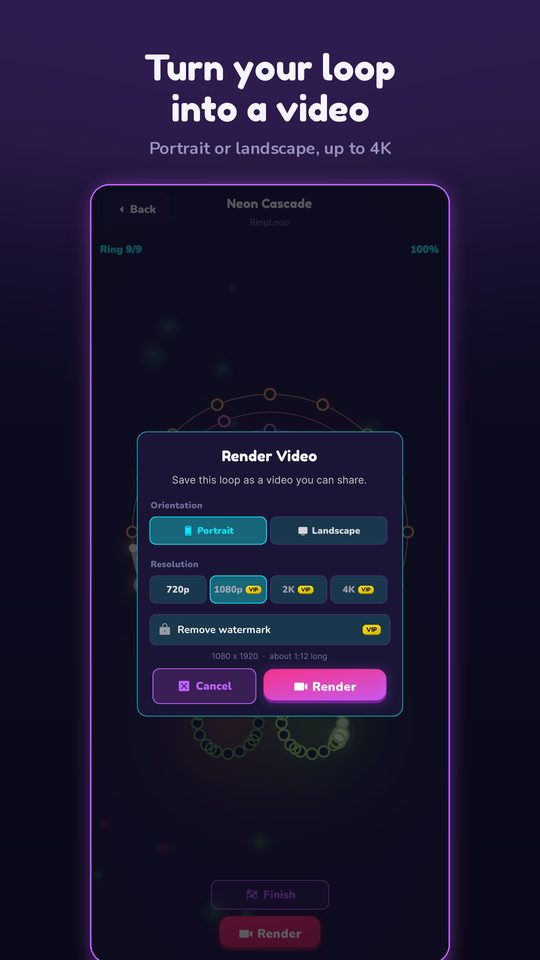
RingLoop works offline and synthesises every instrument on your device from a real SoundFont, so your level uses its own sounds, not your original audio. It shows ads to non-VIP players. VIP unlocks larger renders and watermark-free videos. For the full workflow, see how to turn a MIDI file into a looping music video.
If you'd rather show off the melody of a beat than its layers, Marble Music (formerly Beat Bounce) imports the same kind of MIDI file and turns it into a video of a marble bouncing on every note. It's a quick way to make a visual teaser of a tune you produced, rendered in up to 4K for TikTok, Reels or Shorts.
How to choose in two minutes
Answer these in order and stop at the first yes:
- Do you sing or play an instrument and want to loop yourself? Try Loopy Pro on an iPhone or iPad.
- Do you want to make and save your own tracks for free? Start with BandLab, or GarageBand if you're on an iPhone or iPad.
- Do you just want to hear layers come together, no learning required? Try the Incredibox demo or Groovepad.
- Do you want to play songs ring by ring and post the result as a loop video? Try RingLoop, and bring your own MIDI files when you're ready.
Whichever you pick, give yourself a tiny target for the first session: one 4-bar loop with drums, bass and one melodic layer. Finish that, then add a second section. That habit matters more than which app you open.
Frequently asked questions
- What is the easiest app to make beats?
- For a first beat, a pad- or loop-based app is the gentlest start because every sound is already in time. Groovepad and GarageBand's Live Loops both work this way, and BandLab adds a full free studio when you want to arrange a whole track.
- Is there an app like Incredibox?
- Incredibox itself has a free web demo and a paid app. If you like hearing a song build layer by layer, RingLoop is a rhythm game where each ring you clear adds its instrument to the mix until the whole song plays.
Get RingLoop
Free to play on iPhone, iPad and Android. Import your MIDI, clear the rings and render the loop as a video.